Workspace
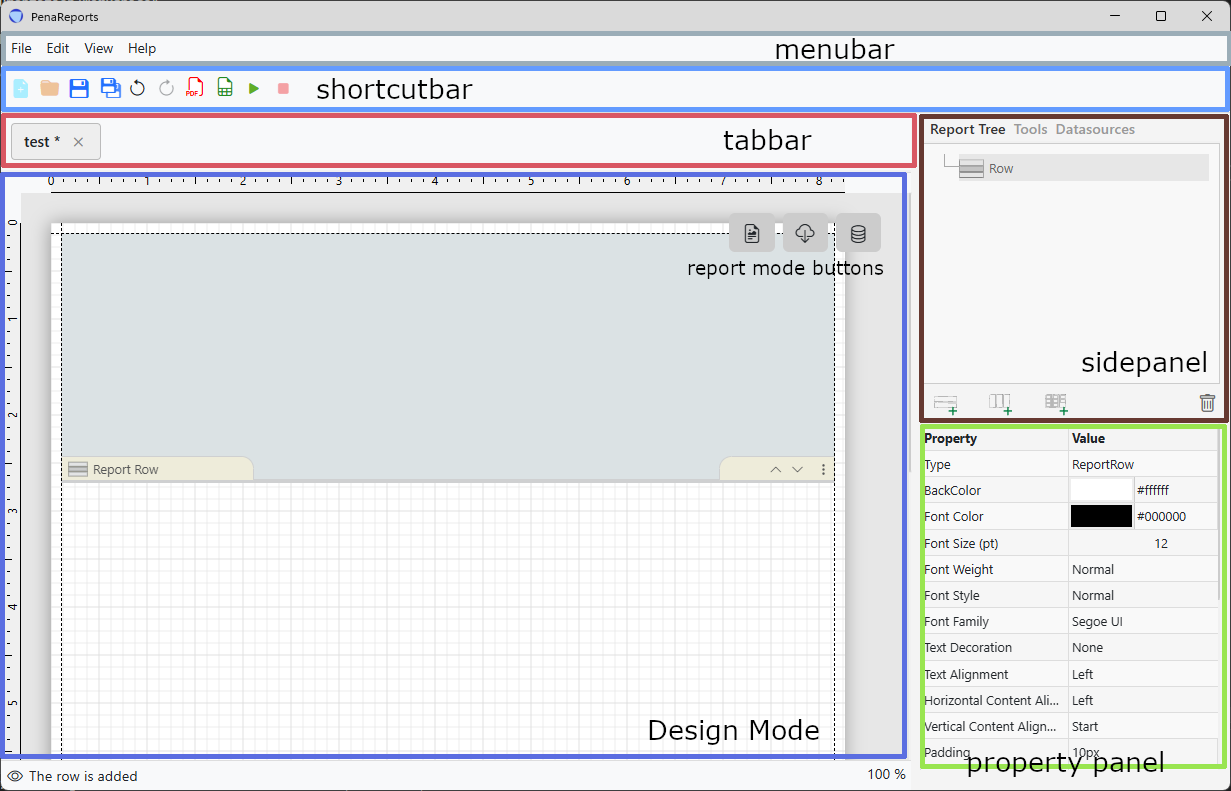
PenaReports Report Builder interface is organized into distinct functional regions, each serving a specific role in the report building process.
- Design Area: The central and most critical region of the workspace. This is the primary area where report elements are placed, arranged, and visualized.
- Design Mode Selector: A specialized button group that allows users to switch workspace views. Beyond the visual layout, it provides access to the dedicated Database (DB) and API Configuration pages for the specific report.
- Sidepanel: The resource library of the workspace. It contains all the necessary report elements that can be added to the report.
- Property Panel: The property area for selected elements. This panel allows you to define and modify the specific attributes, data bindings, and styles of any component within the design area.
- Shortcut Bar: A streamlined region featuring icon buttons for high-frequency actions. It provides immediate access to essential functions without navigating through menus.
- Status Bar : The informational footer of the application. It displays real-time data regarding the report’s current state, including health indicators, save status, and error logs.